
This guide builds a voice bot that answers a phone call, holds a spoken conversation, and completes a real task. Vonage handles the telephony, the speech-to-text and the text-to-speech. Claude decides what to say and which action to take. The workflow is the application in the middle: it owns the conversation, runs the actions, and replies to both.
The example is a dental clinic that books appointments. A caller says what they want, the bot looks up the patient, offers available times, books one, and confirms. If the caller says they are in severe pain, the bot stops booking and transfers them to a human instead.
For example:
- A clinic line that books and cancels appointments outside office hours.
- A support number that identifies the caller and creates a ticket before handing over.
- An order line that reads back a delivery date from your own systems.
What you will build
| Part | Where it lives |
|---|---|
| Incoming call, speech and speech synthesis | Vonage Voice |
| The conversation and the actions | One Bosbec workflow |
| What to say and what to do next | Claude, through the Messages API |
| Call state while the call is running | A unit on your account |
| The conversation so far | A data log on that unit |
Everything on the Bosbec side is one workflow behind one HTTP-in channel. There is no separate service to host.
Before you start
You need a Bosbec account, a Vonage account with a phone number, and an Anthropic API key. The example is available as a Workflow Library template, and Set Up the Voice Bot Template is the checklist for getting it running: the settings and secrets to create, the two groups the bot stores its data in, and how to point Vonage at your channel.
Run it once before reading on. The rest of this guide explains what you just watched happen, and it is easier to follow with the workflow open in front of you.
How a call flows
Almost everything you send to Vonage goes back as the response to a call it made to you, rather than as a separate request. That is the part worth understanding before you build: your workflow does not push audio at Vonage, it answers Vonage's questions with instructions.
Those instructions are a list of actions. Two of them carry the whole conversation:
talkspeaks a line to the caller using text-to-speech.inputlistens, transcribes what the caller says, and posts the transcription somewhere you choose.
Because you are transcribing speech, the result does not arrive on the event URL. It arrives wherever the input action's eventUrl says, so the workflow has a second trigger, /asr, and points the action at it.
The event URL carries something else: Vonage's call lifecycle events, ringing through to completed. This solution ignores them, and has no trigger listening there on purpose. A workflow run per lifecycle event per call adds up quickly, and none of it is something the bot reads.
That URL is built from {{request_resource.header.host}} rather than written out, so it is whatever host Vonage just called. It means the workflow needs no configuration to know its own address, and the same template works on any channel subdomain.
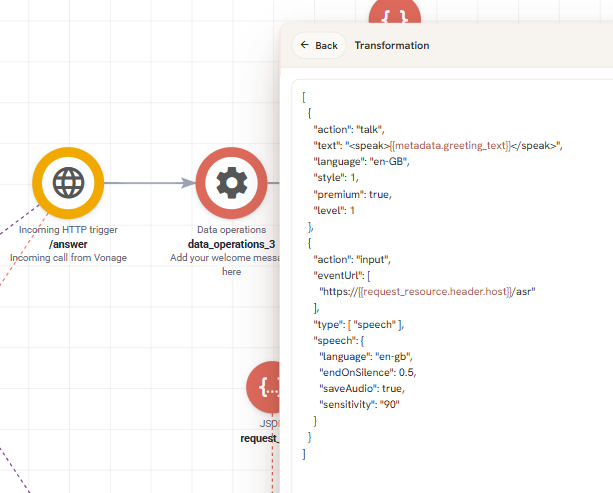
The response to Vonage is built in a JSON pipeline. The talk action speaks; the input action listens and posts the transcription to /asr.
One turn of the conversation then looks like this:
- Vonage calls
/answer. The workflow creates a unit for the call and replies with a greeting plus aninputaction. - The caller speaks. Vonage transcribes it and posts the text to
/asr. - The workflow sends the transcription to Claude, together with the system prompt, the tool definitions and everything said so far.
- Claude replies with one action: either something to say, or a tool to run.
- The workflow acts on it, and answers Vonage with the next
talkandinputpair.
The unit created in step 1 matters more than it looks. It gives the call an identity you can address while it is still running, which is what lets the workflow speak a line or hang up part-way through rather than only in response to a question.
Tell Claude what it is and what it can do
Claude needs two things from you, and they are different in kind.
The system prompt is the brief: who the bot is, how it should speak, what to do in what order, and when to stop and escalate. It is prose, and it is where the judgement lives. The example's prompt is worth reading in full, but the rules that do the most work are the narrow ones:
1. You MUST always respond by calling exactly one of the provided tools. Never write free-form text.
2. Your "speak" text is converted to speech. Never use lists, bullet points, markdown, or symbols.
   Write only natural spoken sentences. Max 2-3 short sentences per turn.
3. Say times as words: "nine thirty in the morning", "two in the afternoon" - not "09:30" or "14:00".
Rules two and three exist because the output is spoken aloud. A model writing for a screen will produce a bulleted list or 14:00, and text-to-speech will read them out as exactly that.
The tool definitions are the technical half: a machine-readable list of the actions available, each with a name, a description of when to use it, and the arguments it takes. They look and behave much like an API contract, and the descriptions are what Claude reads when deciding.
The example defines eight:
| Tool | What it means |
|---|---|
speak_and_listen |
Say something and wait for a reply. The ordinary conversational turn |
request_patient_lookup |
The caller gave an ID number; look them up |
request_slot_lookup |
Search for available appointment times |
request_appointment_lookup |
Fetch the caller's existing appointments |
book_appointment |
Book a specific slot |
cancel_appointment |
Cancel a specific appointment |
transfer_to_agent |
Hand the call to a person |
end_call |
The task is done; say goodbye and hang up |
Ask an AI assistant to help you write both. Describing the job in prose and having it produce a first system prompt and tool schema is faster than writing the JSON by hand, and it tends to produce better tool descriptions, which is the part Claude actually depends on. Give it the example's own prompt and tools as a starting point:
Store both as account settings or in a Data operations job at the start of the flow, so the wording is in one place rather than spread through the workflow.
Call Claude
Build the request with a JSON pipeline job and send it with a Send HTTP request job to the Messages API.
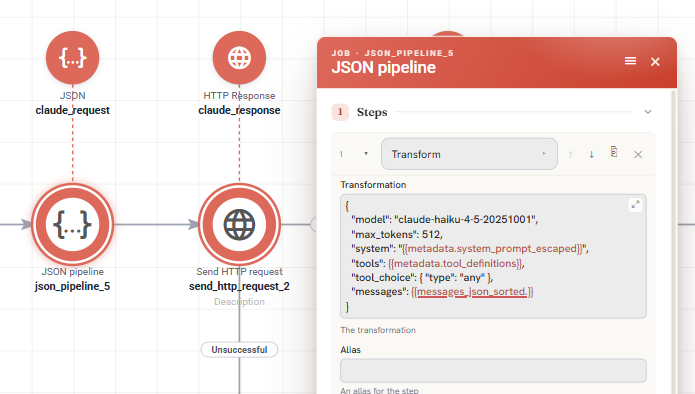
The request Claude receives. tool_choice forces a tool call, so the reply is always an action rather than prose.
The body is small:
{
  "model": "claude-haiku-4-5",
  "max_tokens": 512,
  "system": "{{metadata.system_prompt_escaped}}",
  "tools": {{metadata.tool_definitions}},
  "tool_choice": { "type": "any" },
  "messages": {{messages_json_sorted}}
}
Four of those fields are worth a comment.
model - Haiku is the right choice here. A caller is waiting on the line, so the time to first word matters more than depth of reasoning, and the task is narrow. Do not enable extended thinking for a voice bot.
tool_choice: { "type": "any" } forces Claude to answer with a tool call rather than free text. That is what makes the reply predictable enough to act on: the workflow can route on the tool name instead of parsing prose. Note that newer, larger models reject forced tool use. If you move off Haiku, drop tool_choice and instruct the model to always call a tool in the system prompt instead.
max_tokens: 512 is generous for two or three spoken sentences and keeps the response quick.
messages is the whole conversation, every time. The Messages API is stateless: Claude keeps no memory of the call between requests, so anything it should remember has to be in the array you send.
Keep the conversation yourself
This is the part that surprises people, so it is worth stating plainly: you own the transcript. Every turn, what the caller said, what Claude replied, what a tool returned, has to be appended to a log and sent back on the next request. Nothing is remembered for you.
Use a data log on the call's unit and add to it at each of those three points. When you build the next request, read the log back in order and that is your messages array.
Two practical consequences. The request grows through the call, so a long conversation costs more than a short one. And because the system prompt and tool definitions are identical on every request while only the messages change, they are worth caching. See the Anthropic documentation on prompt caching, which can cut the repeated cost substantially on calls that run more than a few turns.
Run a tool and give the result back
When Claude answers with a tool call, the workflow runs it. For each tool you build a route and the chain of jobs behind it. In practice this is the same work as building an API endpoint, and it is why the job count grows.
The important rule is where the result goes. A tool result goes back to Claude, not to the caller. If the caller asked for times tomorrow, the workflow looks them up and returns the list to Claude, which turns it into a sentence a person would say. The bot's voice stays Claude's, and the workflow never has to write spoken language.
So a turn that uses a tool has two Claude calls in it: one that decided to use the tool, and one that turns the result into speech.
The example's tools read and write units in two groups on your account - the customers who may book, and the slots available to book. That is deliberately the simplest thing that behaves like a real backend: book_appointment sets a slot's status and writes the customer's name onto it, exactly as a call to a real booking system would. Swapping the group lookups for calls to your own system changes those job chains and nothing else.
Transfer the call to a person
Speaking and listening happen in answers to Vonage. Transferring a call does not. It is a request you make to Vonage while the call is up, and it needs authentication.
Vonage authenticates it with a JWT you sign yourself, using the application ID and the private key from your account:
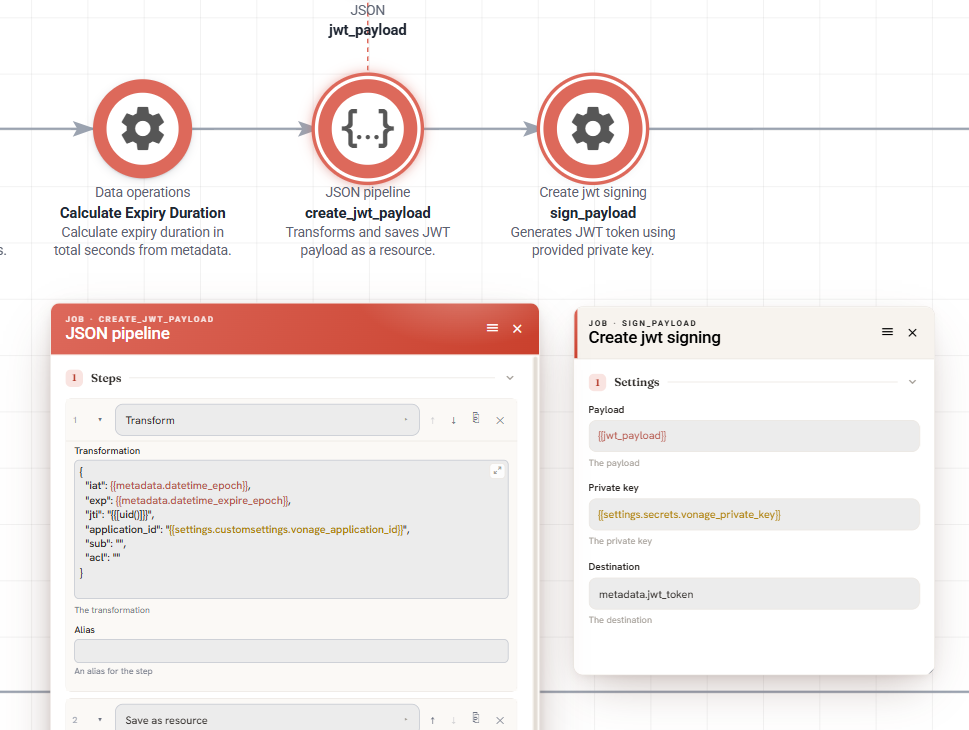
Calculate the expiry, build the payload, sign it. The private key comes from a secret and the signed token lands in metadata.
- A Data operations job works out the expiry as an epoch timestamp.
- A JSON pipeline job builds the payload:
iat,exp, a uniquejti, and yourapplication_id. - A Create jwt signing job signs it with
{{settings.secrets.vonage_private_key}}and writes the token to metadata.
Use that token as a bearer token on the transfer request. Keep the expiry short. The token only needs to outlive the request it authorises.
In the example the transfer is the escalation path for acute pain, and the system prompt is what decides when to take it:
If the patient mentions severe pain, emergency, acute toothache, can't sleep from pain,
or declines all available slots because of pain or urgency:
-> Call transfer_to_agent immediately, regardless of where in the conversation you are.
That rule sits above the conversation flow on purpose. Escalation has to be able to interrupt whatever step the bot is on.
Debugging your own changes
Setup problems - no audio, a 401, the bot not finding anyone - are covered by Set Up the Voice Bot Template. These are the ones that come from changing the conversation itself:
| What you hear | Likely cause |
|---|---|
| The bot answers something unrelated to what you said | The messages array is incomplete. Check what the data log actually holds, in order |
| It asks the same question twice | The previous turn was not appended, so from Claude's side you never answered |
It reads out 09:30, or a list |
The spoken-output rules in the system prompt are missing or too weak |
| It describes a tool result instead of using it | The result went to the caller rather than back to Claude |
| It uses the wrong tool for an obvious request | The tool's description is vague. That field is what Claude reads when choosing |
Follow one call through Workflow Stories first. The request you sent to Claude and the reply you got are both in the log, and most confusion is visible there before you change anything.
Extend the solution
- Replace the group lookups with calls to your real customer and calendar systems.
- Add a tool and a matching route. Adding a capability is adding a tool definition, a route and a chain of jobs. Nothing about the conversation changes.
- Confirm by SMS after booking, using the number the call came from.
- Cache the prompt if calls routinely run long, as described above.
- Change the voice with the
languageandstyleoptions on thetalkaction.
Where to go next
The pattern here is not specific to telephony: a stateless model, a conversation you own, and tools that are really API endpoints. The same shape works for chat, email triage, or anything else where a model needs to decide and then act.
If you are new to building endpoints in Workflow Builder, Building Your First API covers the parts this guide assumes, and Send HTTP Request covers the job that does the talking.