
To receive data from System A using a webhook, the first requirement is an HTTP Channel. An HTTP Channel can be configured either in the admin interface or directly from a trigger in the Workflow Builder.
This results in an HTTP channel with its own unique subdomain, which can then be configured as the webhook endpoint in System A.
Channels and triggers
Channels and triggers share some overlapping settings, such as path and HTTP method. A common approach is to keep the channel relatively open and let it handle all incoming traffic from a specific external system. In this setup, the channel effectively represents an API that System A can call.
Triggers are then used to filter and route incoming requests based on method and path, allowing different workflows to react to different events from the same channel.
The image below shows an example of how an HTTP channel and a trigger could be configured to receive order details from a webshop integration via a POST request.
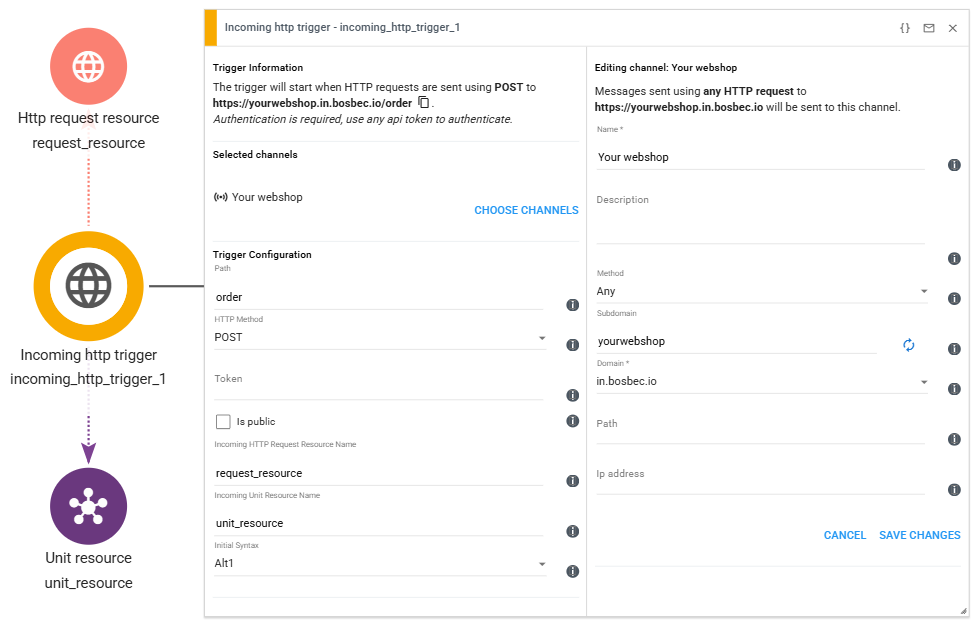
The left side of the window shows the trigger configuration, set to path /order and HTTP Method POST, while the right side shows the channel editing window for “Your Webshop”.
As you can see in the trigger information in the image, the trigger will start when HTTP requests are sent POST to https://yourwebshop.in.bosbec.io/order.
For more specific examples of how to set up an API that your external systems can use, please see Building Your First API.
Authenticating webhook requests
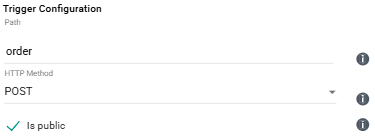
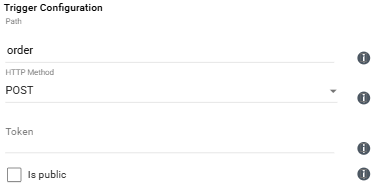
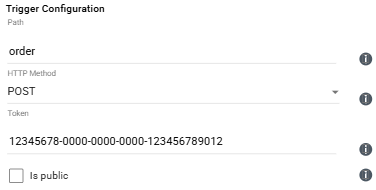
Tokens are used to authenticate incoming webhook requests. There are three common configuration options:
- Allow the trigger to be fully open and accept requests from any source
- Allow requests only if a valid token is provided
- Restrict the trigger to a specific token
These options are configured in the trigger settings, as shown in the images below.
Authentication is covered in more detail in a later article in this guide.
Testing incoming webhooks
We have created a simple example workflow that you can download and import into the Workflow Builder using the button below. This workflow can be used to test how requests are sent to Bosbec.
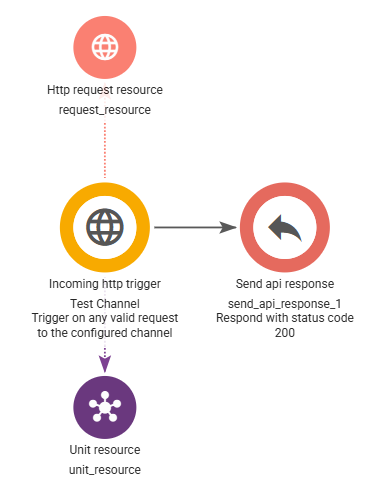
When a request is received successfully, the workflow will respond with an HTTP 200 status code.
Next, we’ll look at how to request data from an external API.