
Not all systems are able to push data updates automatically when changes occur. In some cases, data must instead be retrieved by actively making requests to the external system.
In Bosbec, this is typically done using the Send HTTP Request job.
Configuring an API request
The example below shows how the Send HTTP Request job can be configured to perform a GET Request to System A.
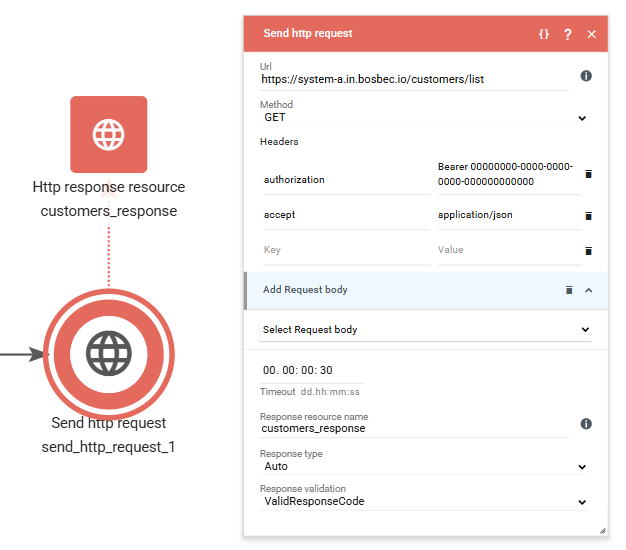
Most APIs require some form of authentication in order to access data. In this example, an “Authorization: Bearer 00000000-0000-0000-0000-000000000000” header is included to illustrate how authentication can be configured.
Authentication methods are covered in more detail in a later chapter of this guide.
Handling the API response
The response from System A is stored in the resource specified in the Response resource name field. In this example, the response is stored as customers_response, but you are free to choose any resource name that fits your workflow.
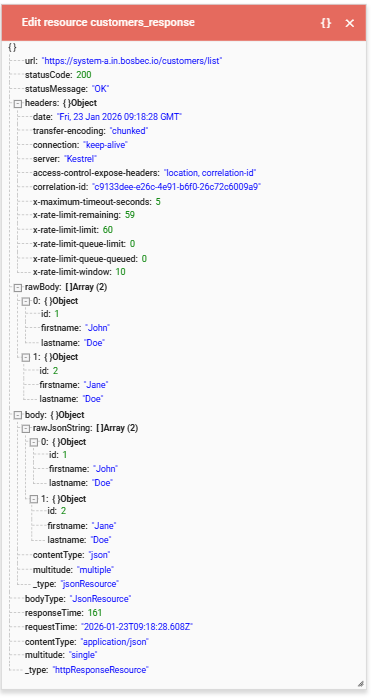
Depending on the response format, the next step is usually to prepare the data for further processing. In this example, System A returns a JSON response, making it appropriate to use the Parse JSON to Resource job to convert the response into a structured JSON resource.
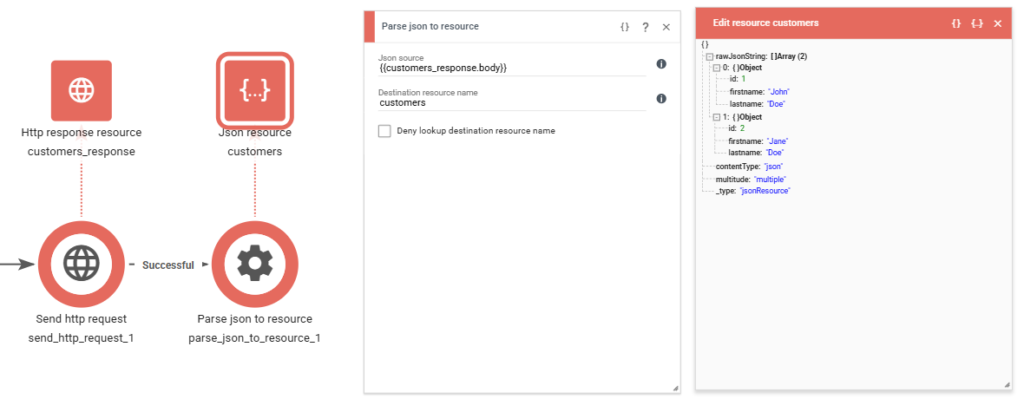
Processing individual records
Once the response has been parsed into a JSON resource, you will often want to process each individual object in the result.
The For Each Resource job is a common starting point for iterating over collections of data and handling records one by one.
Reference implementations and examples
It can also be helpful to review existing integrations to see how similar solutions are typically built, even if the systems involved are not exactly the same as the ones you are working with.
Examples include:
What’s next
In the next chapter, we will look at how files and incoming emails can be used as alternative ways to receive data into Bosbec.