
There are several ways to authenticate API requests. Below, we cover the three most common authentication methods used in Bosbec.
These methods apply both to:
- Incoming requests to Bosbec
- Outgoing requests from Bosbec to external systems
Token authentication
For incoming requests to Bosbec, an API token is required unless the trigger is explicitly left open using the Is public option.
API tokens are created in the admin portal.
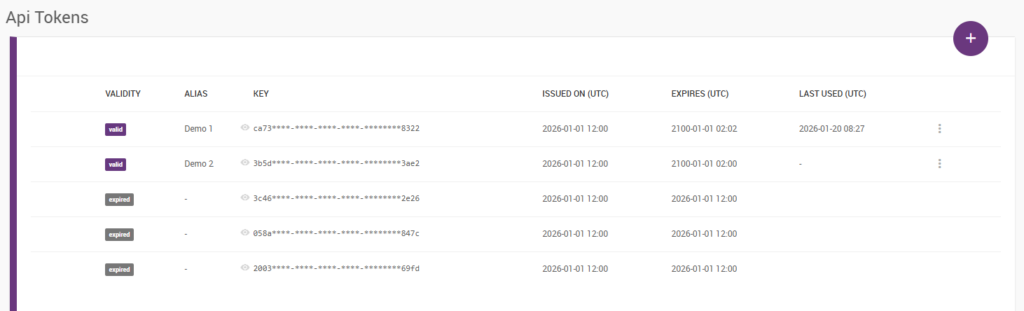
When making a request to an HTTP channel, the token is provided using the Authorization header. For example:
Authorization: abcd****-****-****-****-********1234To configure a Send HTTP Request job to use the same type of token, you add the header in the same way in the job configuration.
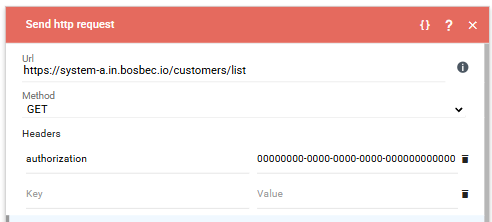
This approach is commonly used for:
- Authenticating incoming webhooks
- Authenticating simple outgoing API requests
Basic Authentication (Basic Auth)
Basic Authentication is a standard HTTP authentication method where a username and password are combined and Base64-encoded.
In practice, this means that the Authorization header is set to:
Authorization: Basic <base64-encoded-username-and-password>The format for the Base64 encoded string is usually username:password.
In Bosbec, this is configured in a similar way to token authentication, with the difference that the value is prefixed with Basic.
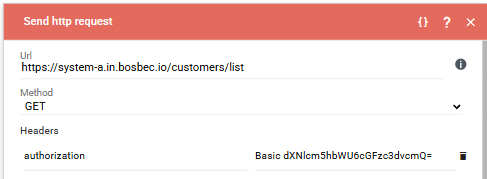
Basic Auth is commonly used in:
- Older APIs
- Simpler integrations where OAuth is not available
For security reasons, Basic Auth should generally be avoided for public or high-security integrations when more modern alternatives are available.
OAuth 2.0
OAuth 2.0 is a widely used authorization framework that allows Bosbec to access an external system on behalf of an application or user, without exposing long-lived credentials such as usernames and passwords.
OAuth typically involves:
- Registering an application in the external system
- Receiving a client ID and client secret
- Exchanging these for an access token
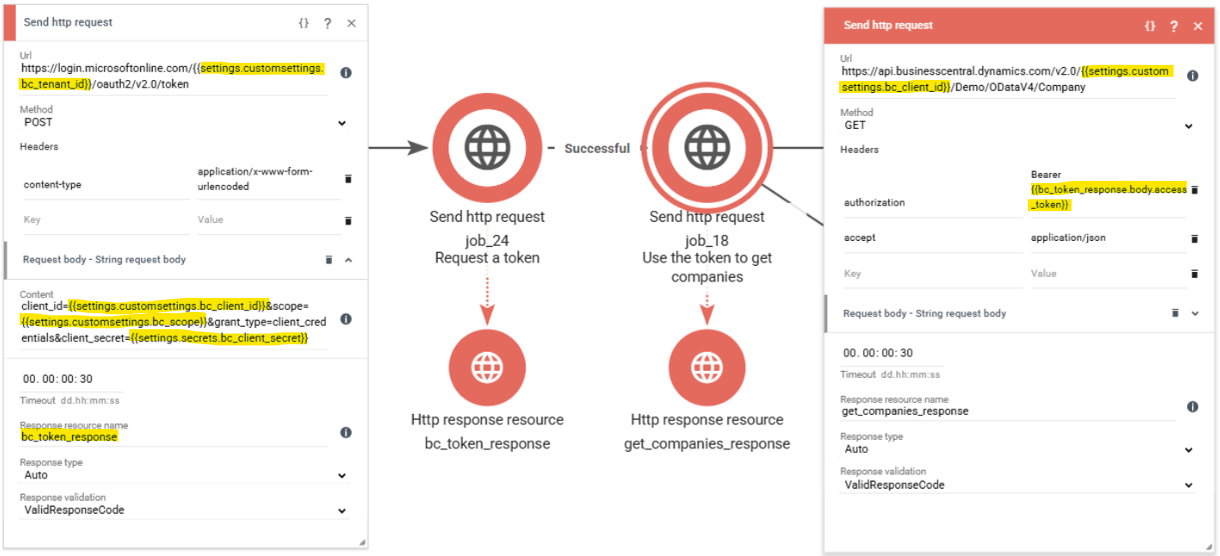
- Using a Bearer token in the Authorization header for API requests
Authorization: Bearer <access_token>OAuth is commonly used by modern SaaS platforms, such as HubSpot or Business Central.
The image below shows how we’ve configured one Send HTTP Request job to get an access token from Business Central using data saved in the account’s settings and secrets, and another Send HTTP Request job that uses the access token from the response in the next step.
Account Secrets
As mentioned in the previous step, Bosbec also provides a feature called Account Secrets, which is used to store sensitive information such as API keys, tokens, and passwords.
Account Secrets are managed in your account settings.
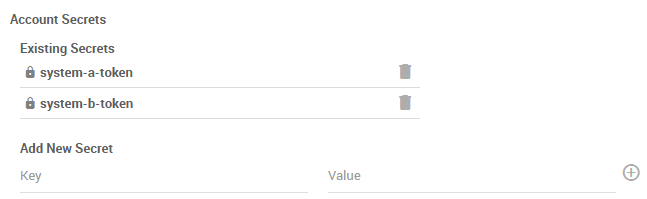
Values are hidden and cannot be viewed or modified once set. If a secret needs to be updated, the existing secret must be removed and a new one created with the same key.
To reference a secret in a job configuration, use the following syntax:
{{settings.secrets.key}}This allows you to:
- Avoid hard-coding sensitive values in workflows
- Rotate credentials without changing workflow logic
- Reduce the risk of accidental credential exposure
Next, we’ll take a look at how you can filter, enrich, and transform the data.