
In the previous step, we created a project description for our to-do web tool. As part of that process, we identified the functions the application needs. The next step is to set up the corresponding API endpoints and build workflows that handle these requests.
At this stage, it can also be useful to ask your AI agent for suggestions about which resources and HTTP requests might be needed. In this project, ChatGPT suggested structuring the API as follows.
Lists
- POST /lists
- Used to create a list
- GET /lists
- Used to retrieve all lists
- GET /lists/{listId}
- Used to retrieve a specific list
- PATCH /lists/{listId}
- Used to update a specific list
- DELETE /lists/{listId}
- Used to delete a specific list
Tasks
- POST /tasks
- Used to create a task
- GET /tasks/{listId}
- Used to retrieve tasks for a list
- PATCH /tasks/{taskId}
- Used to update a task. This endpoint can be used both to update the task name and its completion status.
- DELETE /tasks/{taskId}
- Used to delete a task
- PUT /tasks/reorder
- Used to change the order of tasks
At first glance, this list of endpoints may look somewhat intimidating, but much of the setup can be reused or copied between workflows. To make the project more manageable, it can be helpful to focus on one request at a time.
For example, start by building POST /lists to create a list. Test it with a request and verify that it works. After that, move on to retrieving lists with GET /lists, and continue from there. As you progress, you will likely notice that many parts of the workflows can be reused, and that the main differences are usually the channel and the trigger.
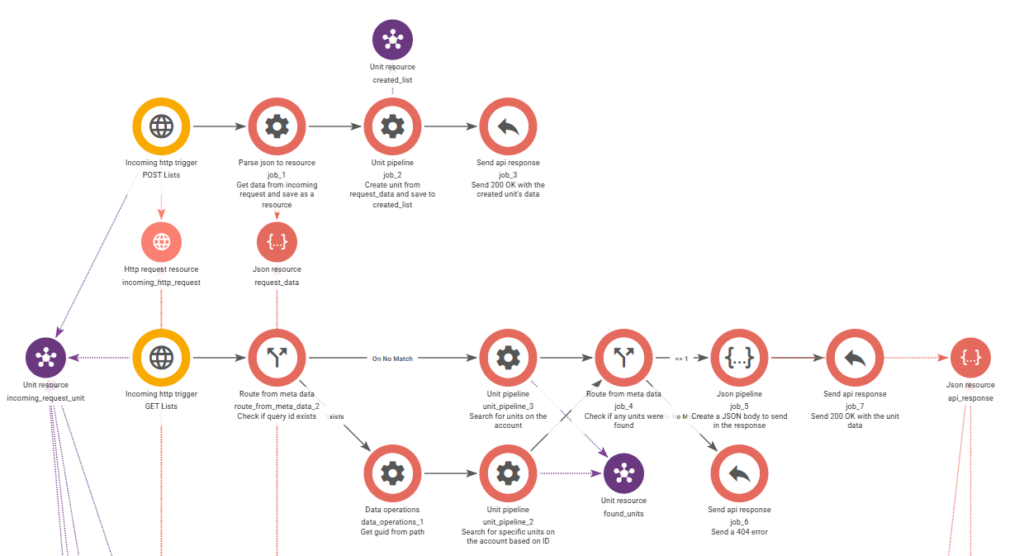
To get something working quickly for testing, we set up the following endpoints as a minimal first version of the project:
- POST /lists
- GET /lists
- DELETE /lists/{listId}
- POST /tasks
- GET /tasks/{listId}
- PATCH /tasks/{taskId}
These provide the basic functionality needed to create/delete lists, add tasks, and update them.
To make it easier for you to explore and experiment on your own, we have also provided a .wfb file containing this initial version of the workflows. You can download the file below and import it into Bosbec.
To import the file:
- Create a new empty workflow.
- Go to File → Import from wfb file.
- Select the downloaded file and import it.
If you want to learn more about how to set up these requests in detail, see our guide Building Your First API.